
Compass calibration of RDI ADCPs#
This is a quick guide showing how RDI compass calibration has typically usually done at NPI in later years. The procedure is a little different for instruments from other manufacturers - should add these eventually!
Note
This is quickly from memory and some sparse notes - so incomplete and likely not entirely right!
Get input from Laura (and Kristen?)
Should have some more instructions about the calibration gear, setting things up and levelling etc.
See if we find some pictures?
Bring this along next calibration to check whether the instructions make sense and add anything that might be useful.
Overview#
ADCP compasses are used to determine the heading of the currents. It is therefore very important that the compasses are calibrated.
Particularly in polar regions, where the horizontal magnetic field component is weak!
When the ADCP batteries are changed, a new calibration should be performed whenever possible.
Ideally, the ADCP should be calibrated in the magnetic environment where it will operate - in practice this is basically never possible. The second best approach is to calibrate it in an environment with minimal magnetic interference.
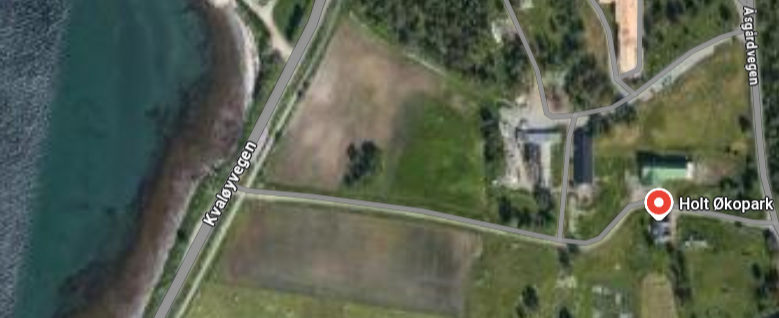
We typically do this at Holt, where a large open space with no metal and few people is available.

A good place to do this: somewhere on the dirt road between Kvaløyvegen and Holt Økopark
During calibration, the ADCP is physically rotated at different tilts. A programmed routine provides instructions and underway assesment. If successful, this procedure produces a new calibration which is then programmed into the instrument.
Physical setup#
This is a two-person job at minimum.
Does not take very long, but it is a good idea to calibrate multiple instruments at once to save time.
We have typically allocated about half a day to calibrate the season’s worth ADCPs.
You will be outside, so it is a great idea to choose e.g. a day in May when the weather is nice..
Avoid having metal objects in the vicinity of the calibrating instrument (empty your pockets..)
For 300 kHz instruments: Use the custom-made calibration frame we have at NPI.
150 kHz instruments are too bulky for the frame. They are instead placed at different angles within the instrument crate, and the crate is rotated.
The instrument should ideally be calibrated in the direction in which it will operate - i.e. a downward-looking instrument should be calibrated facing down and vice versa. In practice, we have not always followed this recommendation.
Teledyne RDI recommend against doing compass calibrations at latitudes higher than 75 degrees (ref).
Calibration should not be done on a ship. We have occasionally done calibrations on fast ice or ice shelves in order to get away from the motion and magnetic fields on a ship.
Procedure#
Place the instrument with a tilt either in the instrument crate or in the calibration frame.
Connect the ADCP serial cable to a laptop and open the
BBTalksoftware.Typically: choose baud rate either 9600 or 115200 (use whichever works in the following step).
Press
Enterto send a break.If successful, you should see a readable wakeup string.
If not, try another baud rate.
Create a log file from BBTalk by pressing
F3Choose a file name including the serial number and date.
Enter the command
afto start the calibration routine:Enter
ato choose “hard iron calibration” andaagain to start - then follow the instructions from the program.The ADCP compass direction should be displayed, looking something like this:
  Rotate the unit in a plane until all data samples are acquired...
  rotate less than 5ø/sec.  Press Q to quit.

  N       NE       E        SE       S       SW        W        NW       N

  ^                ^                 ^                 ^                 ^
              Û
  *************************************************************************

  Accumulating data
You should be able to see the angle indicator move as the instrument is rotated.
One person rotates the instrument (slowly! carefully! mind the cable!).
Aim for about 5 degrees per second - a little more than a minute for the whole rotation.
Another person keeps an eye on BBTalk. It should show a gradual change in compass heading as the instrument is rotated.
Watch out for sudden jumps in heading - this may mean that there is an issue with the compass!
When the rotation is complete, the program will let you know when to stop, and tell you to change the tilt. Do this by rotating the instrument >15 degrees within the frame or crate so that the tilt axis changes.
Repeat the procedure to get full rotation at 3 different tilt axes.
When this is done, the program will give you an error of the new calibration, e.g.:
               >>> Total error after calibration:  2.2ø <<<

  Please select one:

  a. Keep old calibration.

  b. Use new calibration.

  c. Show me the detailed error summaries before I decide.
We want this to be below 5 degrees.
If <5 degrees: Follow instructions to
Use new calibrationto the new calibration into the instrument.If >5 degrees:
Perform another calibration (
af). Make sure you are rotating the instrument slowly.If the error does not get below 5 degrees, we need to make a lookup table so we can correct for heading errors in post-processing.
When complete, enter the command
czto put the ADCP to sleep.
Lookup table#
If we can’t get the calibration error <5 degrees, we create a lookup table: A table showing the measured ADCP compass angle as a function of “true” compass angle. We can use this to correct the current heading when post-processing the data.
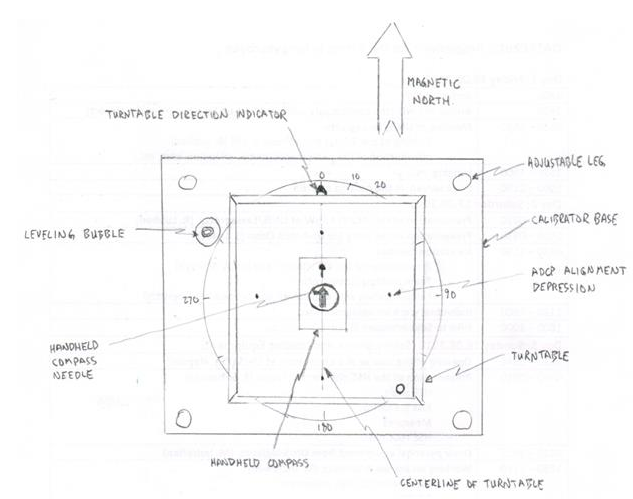
Illustration of turntable from ASL Env
Place the the rotating table (also part of NPIs calibration kit) level on the ground, and align it so so that the turntable direction arrow aligns with true north (as measured by an external compass).
Place the ADCP (still connected to the computer) at near zero tilt on the rotating table.
Align Beam 3 of the ADCP with the north arrow.
Beam 3 is often indicated with a notch mark on the instrument, alternatively a drawn arrow.
Start with the rotating disk at 0 degrees offset.
Enter
pc2in BBTalk to display the ADCP compass heading. Record this value as the “ADCP heading” for 0 degree “true heading*.Rotate the disk 20 degrees clockwise, enter
pc2again and read off this value as the “ADCP heading” for 20 degree “true heading*.Continue around the circle in 20-degree increments until you get to 360 degrees.
Make sure to keep track of the table, the calibration log file, and the calibration error.
When complete, enter the command
czto put the ADCP to sleep.
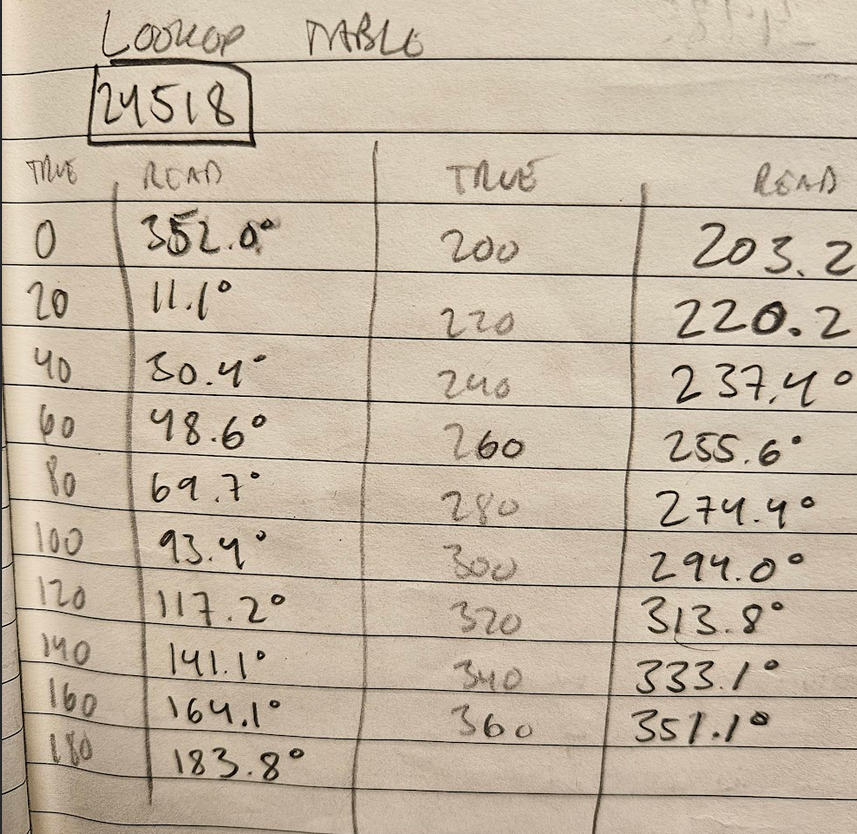
Example of a lookup table with particularly exquisite handwriting
Tips#
Make sure not to remove the batteries after calibrating. If you do, you need to perform a new calibration!
If the compass is “stuck” (i.e. does not smoothly rotate through the full 360 range):
Try resetting the compass with the command
arTry remounting/flipping the ADCP batteries
If the problem persists, contact RDI. Do not deploy the instrument! (unless it is in a fixed-direction configuration).
If you only want to verify an existing calibration (i.e. not create a new one), you can use the ax command. This will guide you through a rotation and at the end yield an compass error.
There is some additional information in the TRDI Workhorse manual (p58).