
MSS setup#
Connecting#
Depending on conditions, ship, and setup, it may make sense to keep the deck unit and laptop somewhere away from the winch (maybe in a nearby container or indoor space). The laptop can be moved out for deployments.
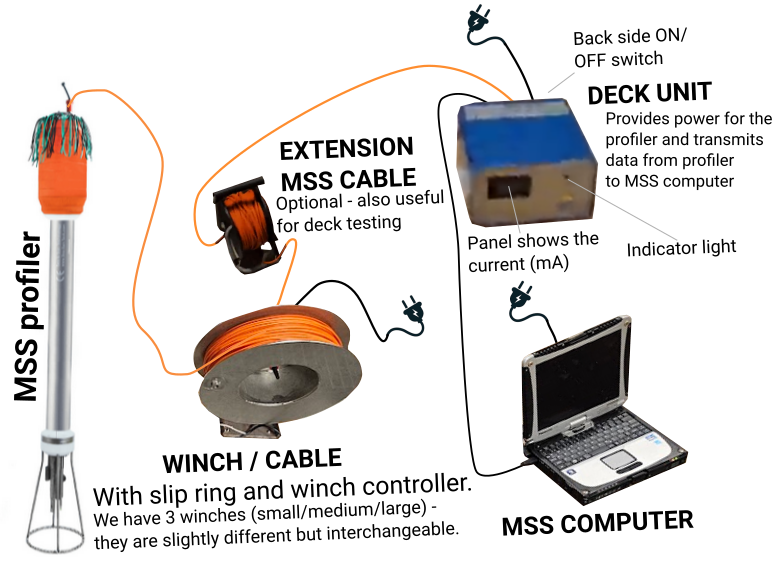
Simplified schematic of MSS setup.
Starting up#
Connect all elements
Turn on the deck unit
Red light should come on, indicating that data logging is not in place
Panel should show a current below 40 mA (typically 30-35 mA)
Open the
SDAsoftwareYou should now see the data stream.
Make note of which configuration (
.spj) file is used .
What is displayed in the deck unit panel?
The system is set up such that the voltage across the profiler is held constant.
If the resistance in the loop (deck unit - cable - profiler) increases, e.g. due to using a longer cable, the supply voltage in the external loop is adjusted up in order to maintain the voltage felt at the profiler constant.
This increase in external voltage results in an increase in the current through the loop. This is what is displayed in the deck unit panel.
Mounting on the railing#
It takes a bit of wriggling to set up the mounting frame. Use loading straps etc. The winch is heavy!
When the frame is in place:
Mount the motor
Mount the spool
❗ Be careful - this happens over the railing..
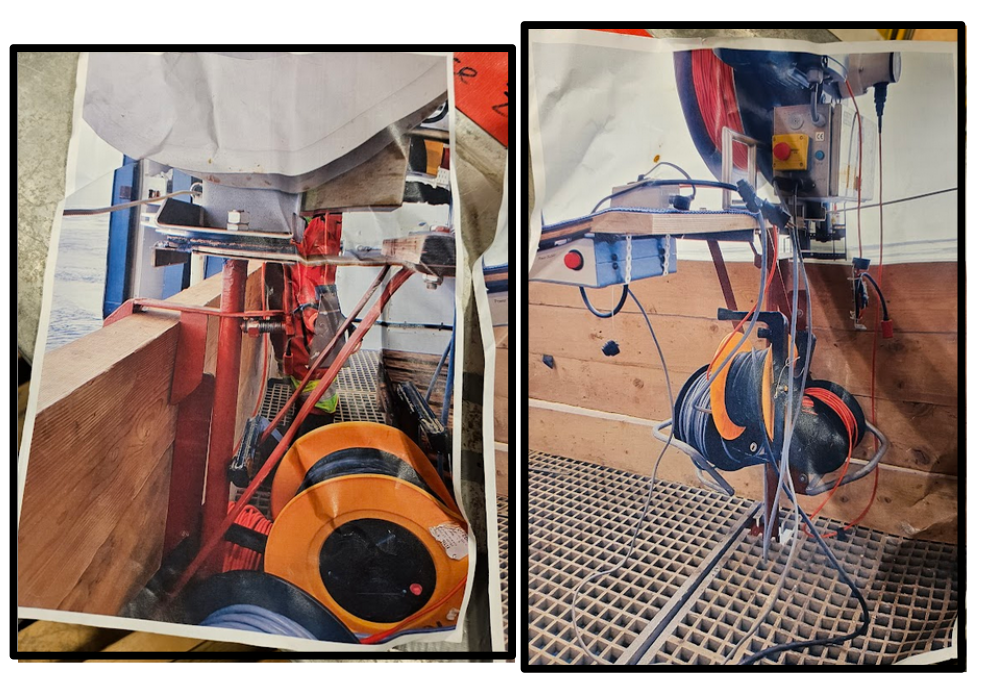
Photos of deck setup on railing on previous TrollTransect cruises.