
Tascam acoustic recorder#
Note
Based on document Quick User Guide for Tascam recorder written by Heidi Ahonen.
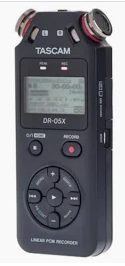 Tascam acoustic recorder: Handheld unit used for recording sound from hydrophones.
Quick User Guide for Tascam recorder#
Hydrophone plugs into jack socket on top of the recorder (MIC/EXT IN)
Headphones plugs into jack socket left side of the recorder (MIC IN)
To turn on press HOME button for good 2-3 seconds
When used with hydrophone (to listen or record):#
To just listen but not record press once RECORD button (red light will flash) and to get out of this stage press HOME button.
To adjust headphone volume level press
+and–buttonsTo adjust recording level press
<<and>>buttons
If you want to record, press second time RECORD button (red light on all the time plus in the screed you have this symbol: ⬤)
If you want to pause the recording just press again RECORD button. Recording will continue on same track if you press again RECORD.
To STOP recording press HOME button
If you don’t hear anything and you have checked that volume is up for both headphones and recording level, then go to MENU – select REC SETTINGS – check that MIC POWER is ON.
To listen tracks that you have recorded just select track with << and >> buttons on main screen and press play.
To delete tracks press QUICK –DELETE-and PLAY button to confirm that you want to delete the track
To turn the device off press HOME button for good 2-3 seconds
When used with speaker (to play sounds):#
Select tracks with
<<and>>buttonsPress
▶to play trackPress
■to pause track to current spotPress
■again to stop track and go to beginning of that track+and-will adjust the volume